The Smell of Molten Projects in the Morning

Ed Nisley's Blog: Shop notes, electronics, firmware, machinery, 3D printing, laser cuttery, and curiosities. Contents: 100% human thinking, 0% AI slop.

Month: August 2010

  • Useful Minicom Defaults

    I usually figure this stuff out for each minicom setup; now I can just refer here and get it right the first time.

    Run minicom -s the first time to set the internal configs:

    • Port typically /dev/ttyUSB0 for USB-serial adapter
    • 19200 8N1 for lack of anything smarter
    • No hardware flow control
    • Software flow control
    • Clear modem Init and Reset strings to blank
    • No DCD line
    • Set colors as below

    Your favorite colors will differ; these are Old-Skool:

    • Menu: white on blue
    • Status: black on cyan
    • Terminal: green on black

    Save that as the overall system default.

    Set command-line defaults in ~/.bashrc:

    • -m to use Alt+key rather than Ctrl-A and then the key
    • -c on to see those pretty colors

    Which will look like

    MINICOM='-m -c on'
    export MINICOM
    

    And then it Just Works…

  • CPU Heatsink Fuzz

    My PC makes a seasonal migration: to the basement during the summer, to the living room in the winter. Those moves provide an opportunity to vacuum the fuzz out of the fan grilles and heatsinks.

    You’d think that, given the trouble caused by blocked air inlets, manufacturers would make it easy to get access to the grilles and trivially easy to remove the fuzz. Not so, alas.

    This time, I decided to see what the intake side of the main heatsink looked like. Two screws secure the shell to the circuit board and provide clamping pressure on the CPU heat spreader. The heatsink is a massive affair with liquid-filled heat pipes; I’ve never taken it out before because removing the screws exposes the CPU heat spreader, where you do not want to get fuzz.

    Heatsink fuzz
    Heatsink fuzz

    Oops!

    A bit of work with the vacuum and a brush greatly improved the situation. I think I kept the fuzz out of the heatsink-to-CPU joint, but there’s really no way to know because, as nearly as I can tell, Dell didn’t include any of the CPU temperature readouts on this system board.

    Memo to Self: Gotta do that more often …

  • American Standard Elite Kitchen Faucet: More O-ring Troubles

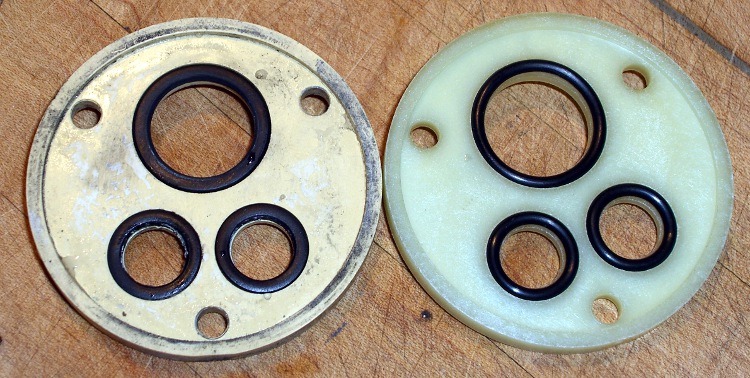
    Half a year after replacing the O-rings on the kitchen faucet, it’s dribbling again. This time, the symptom looked like a leak from the top of the faucet, which implied the three O-rings on the Spacer plate rather than big O-rings that seal the spout.

    You can see the O-rings look different on the old and new spacers …

    Old and New Faucet Spacers
    Old and New Faucet Spacers

    Indeed, the old O-rings are flattened out. It’s most visible over on the right edge of the lower ring; the top ring is new.

    Flattened O-ring
    Flattened O-ring

    Replacing them is no big deal; follow the directions in the earlier post to get everything apart. But: only half a year?

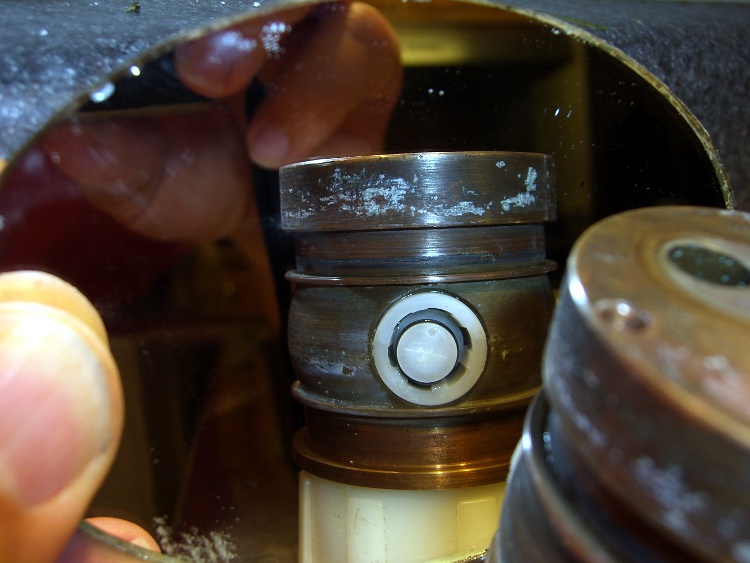
    Here’s a view of the diverter on the back of the column.

    Diverter viewed in mirror
    Diverter viewed in mirror

    Notice that the larger O-rings that seal the spout to the column had glued themselves to the column and left shreds when I removed them. A narrow strip of Scotch-Brite scouring pad, applied shoe-shine style, cleaned the O-ring debris off the column and made it nice & shiny. I suppose as long as they slip freely on the spout, then it’s all good, but there are new ones in place now.

    I used a bit more silicone grease on the O-rings this time; we’ll see if that makes it better or worse.