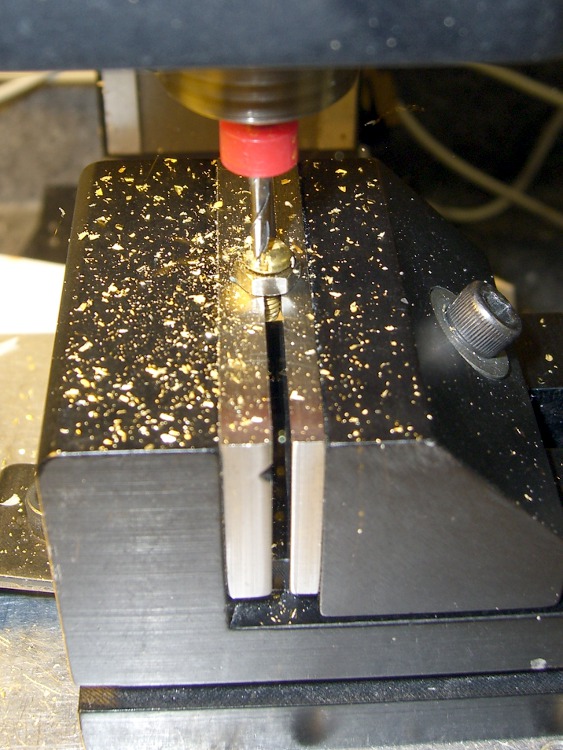
Faced with the daunting prospect of converting half a dozen 4-40 brass screws into battery contacts by hand filing, I did what I should have done in the first place: turn it into a CNC project.
It’s quick-n-easy:
- mill the head flat and 0.5 mm thick
- shave off the sides
I grabbed the screw in the Sherline vise, touched off XY on the head (close enough to being concentric for this purpose), and touched off Z on the nut supporting the screw. For the next few, I’ll eyeball the Z touchoff at the bottom of the head, rather than the nut, because the heads don’t quite sit flush on the nut.
They dropped right into place, without any filing or fiddling! Well, the second one did. I had to tweak the dimensions slightly to make the answer come out right. But that’s one of the advantage of hammering out simple G-Code like this: change two lines and wham you’re done.
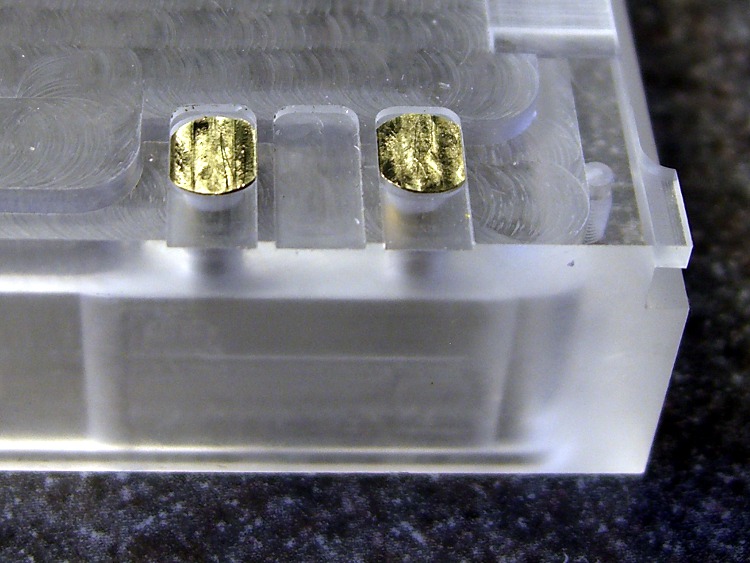
The heads show some tool marks, but that’ll just make the silver solder stick better. Right?
Herewith, the G-Code…
(ICOM IC-Z1A battery pack shell)
(Battery pack contacts)
(Ed Nisley - KE4ZNU - June 2010)
(Vise clamping on threads, XY orgin on central axis, Z=0 at *bottom* of screw head)
(Tool table used just for Axis previews and to activate "manual" changer via M6)
(Tool change @ G30 position above length probe)

(-- Global dimensions & locations)

#<_Traverse_Z> =        5.0
#<_Cutting_Z> =            0.0

(-- Get started ...)

G40 G49 G54 G80 G90 G92.1 G94 G97 G98        (reset many things)

M5
(msg,Verify XY=0 on screw axis)
M0

(msg,Verify tool touched off at Z=0 on *bottom* of head)
M0

(debug,Verify vise clearance around head)
M0

#<Contact_Width> =        4.1            (X axis metallic contact - minus a smidge)
#<Contact_Head_Dia> =    5.5            (recess for 4-40 head)
#<Contact_Head_Radius> = [#<Contact_Head_Dia> / 2]

#<Contact_Head_Depth> =    0.7            (recess depth - plus  smidge)

#<Mill_Dia> =            1.98            (end mill diameter)
#<Tool_Num> =            20
#<Mill_Radius> =        [#<Mill_Dia> / 2]
#<Mill_RPM> =            5000
#<Mill_Feed> =             50

(debug,Verify #<Mill_Dia> mm end mill)
M0

(debug,Set spindle to #<Mill_RPM>)
M0

F#<Mill_Feed>

(--- Flatten the head)

G0 Z#<_Traverse_Z>

#<X_Step> = [0.5 * #<Mill_Dia>]
#<X_Limit> = [3 * #<Mill_Radius>]
#<Y_Limit> = [#<Contact_Head_Radius> + #<Mill_Radius>]

#<X_Coord> = [0 - #<X_Limit>]

G0 X#<X_Coord> Y[0 - #<Y_Limit>]
G0 Z#<Contact_Head_Depth>

O<Head_Trim> DO

G1 Y#<Y_Limit>
#<X_Coord> = [#<X_Coord> + #<X_Step>]
G1 X#<X_Coord>
G1 Y[0 - #<Y_Limit>]
#<X_Coord> = [#<X_Coord> + #<X_Step>]
G1 X#<X_Coord>

O<Head_Trim> WHILE [#<X_Coord> LT [3 * #<Mill_Radius>]]

G0 Z#<_Traverse_Z>

(--- Trim the sides)

#<Arc_Radius> = [#<Contact_Head_Radius>]
#<Half_Width> = [#<Contact_Width> / 2]
#<Angle> = ACOS [#<Half_Width> / #<Arc_Radius>]
#<Half_Height> = [#<Arc_Radius> * SIN [#<Angle>]]

G0 Z#<_Traverse_Z>

G0 X[0 - #<Half_Width>] Y[0 - #<Contact_Head_Radius> - 3 * #<Mill_Dia>]
G0 Z#<_Cutting_Z>

G41.1 D#<Mill_Dia>
G1 X[0 - #<Half_Width>] Y[0 - #<Half_Height>]

G1 Y#<Half_Height>
G2 X#<Half_Width> I[#<Half_Width>] J[-#<Half_Height>]
G1 Y[0 - #<Half_Height>]
G2 X[0 - #<Half_Width>] I[-#<Half_Width>] J[#<Half_Height>]
G1 Y#<Half_Height>

G0 Z#<_Traverse_Z>

G40

G30                    (back to tool change position)

(msg,Done!)
M2

 The Smell of Molten Projects in the Morning