
They seem to be referring to an auto-wedgie, not the dreaded atomic wedgie.
The weird part? This was in the ladies’ section. We were picking up socks for our own young lady…
The Smell of Molten Projects in the Morning
Ed Nisley's Blog: Shop notes, electronics, firmware, machinery, 3D printing, laser cuttery, and curiosities. Contents: 100% human thinking, 0% AI slop.
They seem to be referring to an auto-wedgie, not the dreaded atomic wedgie.
The weird part? This was in the ladies’ section. We were picking up socks for our own young lady…
One of our nice aluminum water bottles hit the floor and, of course, the tiny little hinge shattered. It’s some wonderful engineering plastic, but just look at the leverage you can apply to those few millimeters of material. This is the sort of repair that can’t possibly be economically justified, but it pisses me right off when something that should be rugged turns out to be this fragile.
The 2 mm steel hinge pin snapped the molded plastic center post of the hinge off the cap; we found the larger fragment, but the smaller one may lurk under the refrigerator for quite some time. Nothing bonds to this plastic and, if the post broke in the first place, adhesive isn’t going to help.

Some doodling showed that a replacement hinge post should be machineable. The general idea was to square up the remaining chunk of the post, then attach a replacement hinge pivot with a screw. The post is almost exactly 1/4-inch thick, call it 6.2 mm, which means the right-angle feature under the pivot ought to keep the whole affair from twisting.

I planned to leave the left side unmachined and cut it to fit by hand, but then figured, eh, just make it happen. I also expected to leave the area around the screw a lot thicker, with a neat counterbore around the head.
This being a bash-to-fit, file-to-hide kind of project, I wrote a snippet of G-Code (at the bottom of the post) to chew out the part from a sheet of Lexan, then did the perpendicular hole & countersinking with manual CNC.
No pix of that; I was working in a white-hot fury. Basically, I double-sticky-taped a slab of Lexan to a sacrificial sheet, clamped it to the tooling plate, and had at it with a 2 mm end mill. Cutting a 6.4 mm sheet with a 2 mm end mill is a bit iffy, as the flutes are just barely that long; the mill was armpit-deep in swarf and I was dribbling water into the cut to keep it cool.
By the time I stopped for a picture, the situation looked like this.

For what it’s worth, that’s the second part. I had to lower the screw head below the top of the half-round feature on the left end in order to clear the cap. That’s what CNC is really good for in my shop: make another one, just like the other one, only different exactly like that.
I drilled a #50 (2-56 tap) hole in the cap pretty much by eye, using laser targeting to touch off.

The hole wound up minutely too far inboard, but some filing cleaned up the stub edge and it was all good. I started the tap in the mill, held loosely in the chuck and turning it with my fingers, then finished up on the bench.
The screw hole goes all the way through the cap. I filed the screw down so the end sits flush at the bottom of the cap, where the silicone rubber gasket should seal firmly against it.
Here’s what the hinge looks like with all the bits assembled. The spring bears on the screw head, which makes the cap open with more snap than before. I put a little counterbore under the screw head, even after lowering it, to reduce the spring tension.

The cap has a spring-loaded latch that never worked very well in the first place and this repair didn’t improve it. As nearly as I can tell, the molded ledge on the cap has a rounded edge that the latch simply cannot engage. This is beyond even my level of interest; Mary was accustomed to using the wire snap to hold the cap closed and that practice will continue.
Works well enough for us and I got some Quality Shop Time on a rainy afternoon.
The G-Code uses a slightly modified & simplified version of the tool length probe routines. I’m not convinced that using the G59.3 coordinate system is the right way to go, but everything else seems worse.
(Water bottle hinge repair)
(Ed Nisley - KE4ZNU - June 2010)
(Rough-cut 1/4-inch plate with clamp at +Y)
(Sacrificial plate below, double-stick tape to secure)
(Tool change @ G30 position above length probe)

(-- Global dimensions & locations)

#<_Stock_Thick> =        6.5                    (overall thickness)

#<_Traverse_Z> =        1.0
#<_Safe_Z> =            30.0                (clamp clearance)

(-- Section controls)

#<_Do_Outline> =    1
#<_Do_Drill> =        1

(-------------------)
(-- Initialize new tool length at probe switch)
(    Assumes G59.3 is still in machine units, returns in G54)

#<_Probe_Speed> =        250            (set for something sensible in mm or inch)
#<_Probe_Retract> =        1            (ditto)

O<Probe_Tool> SUB

G49                    (clear tool length compensation)
G30                    (to probe switch)
G59.3                (coord system 9)

G38.2 Z0 F#<_Probe_Speed>        (trip switch on the way down)

G91
G0 Z#<_Probe_Retract>            (back off the switch)
G90

G38.2 Z0 F[#<_Probe_Speed> / 10]    (trip switch slowly)

#<_ToolZ> = #5063                    (save new tool length)

G43.1 Z[#<_ToolZ> - #<_ToolRefZ>]    (set new length)

G54
G30                    (return to safe level)

O<Probe_Tool> ENDSUB

(-------------------)
(-- Initialize first tool length at probe switch)

O<Probe_Init> SUB

#<_ToolRefZ> = 0.0        (set up for first call)

O<Probe_Tool> CALL

#<_ToolRefZ> = #5063    (save trip point)

G43.1 Z0                (tool entered at Z=0, so set it there)

O<Probe_Init> ENDSUB

(-------------------)

(-- Get started ...)

G40 G49 G54 G80 G90 G92.1 G94 G97 G98        (reset many things)

M5

(msg,Verify clamp to +Y, stock taped down)
M0

(msg,Verify X=0 at left edge, Y=0 on finished centerline)
M0

(msg,Verify tool touched off at Z=0 on surface)
M0

O<Probe_Init> CALL

T0 M6                            (ensure first tool change pauses)

(-- Drill the hinge pin hole)

#<Pin_X> =                7.0
#<Pin_Y> =                0.0

#<Drill_Dia> =            2.06    (Drill diameter)
#<Drill_Num> =            46        (Drill number)
#<Tool_Num> =            146        (Tool number)
#<Drill_Radius> =        [#<Drill_Dia> / 2]
#<Drill_RPM> =            3000
#<Drill_Feed> =         [#<Drill_Dia> * 100]

#<Drill_Depth> =        [#<_Stock_Thick> + 2 * #<Drill_Dia>]

O<Doing_Drill> IF [#<_Do_Drill>]

(debug,Insert Num #<Drill_Num> drill)
T#<Tool_Num> M6

O<Probe_Tool> CALL

(debug,Set spindle to #<Drill_RPM>)
M0

F#<Drill_Feed>

G0 Z#<_Traverse_Z>

G83 X#<Pin_X> Y#<Pin_Y> Z[0 - #<Drill_Depth>] R#<_Traverse_Z> Q[2 * #<Drill_Dia>]

O<Doing_Drill> ENDIF

(-- Mill outline)

#<Hinge_Radius> =        3.75                        (half-width of hinge body)
#<Cutout_Base> =        2.75

#<Cutout_Screw> =        1.50
#<Cutout_Screw_Y> =        [#<Hinge_Radius> - #<Cutout_Screw>]
#<Cutout_Screw_A> =        ASIN [#<Cutout_Screw_Y> / #<Hinge_Radius>]
#<Cutout_Screw_X> =        [#<Hinge_Radius> * COS [#<Cutout_Screw_A>]]

#<Passes> =                3

#<Mill_Dia> =            1.98            (end mill diameter)
#<Tool_Num> =            20
#<Mill_Radius> =        [#<Mill_Dia> / 2]
#<Mill_RPM> =            3000
#<Mill_Feed> =            100

#<Entry_XL> =            [0 - #<Mill_Dia>]
#<Entry_YL> =            [0 - 2 * #<Hinge_Radius>]

O<Doing_Outline> IF [#<_Do_Outline>]

(debug,Insert #<Mill_Dia> mm end mill)
T#<Tool_Num> M6

O<Probe_Tool> CALL

(debug,Set spindle to #<Mill_RPM>)
M0

F#<Mill_Feed>

G0 X0 Y[0 - 2 * #<Hinge_Radius>]    (get to comp entry point)
G0 Z#<_Traverse_Z>

G42.1 D#<Mill_Dia>                                    (cutter comp right)
G1 X#<Pin_X> Y[0 - #<Hinge_Radius>]

#<Step_Z> = [#<_Stock_Thick> / #<Passes>]
#<Current_Z> = [0 - #<Step_Z>]

O<Outline_Passes> REPEAT [#<Passes>]

G2 J[0 - #<Hinge_Radius>] Z#<Current_Z>                (ramp down to cutting level)

G3 Y#<Hinge_Radius> J#<Hinge_Radius>
G3 X[#<Pin_X> - #<Cutout_Screw_X>] Y#<Cutout_Screw_Y> J[0 - #<Hinge_Radius>]
G1 X0
G1 Y[0 - [#<Hinge_Radius> - #<Cutout_Base>]]
G1 X#<Pin_X>
G1 Y[0 - #<Hinge_Radius>]

#<Current_Z> = [#<Current_Z> - #<Step_Z>]

O<Outline_Passes> ENDREPEAT

G0 Z#<_Safe_Z>

G40

O<Doing_Outline> ENDIF

G30                    (back to tool change position)

(msg,Done!)

M2
So a few days after topping off the continuous ink tanks on my Epson R380 printer, we had a series of thunderstorms that prompted me to turn everything off. Upon turning the printer back on, its fancy LCD panel showed a message along the lines of
Service is required. Contact Epson Customer Service.
Oddly, it continued to print perfectly with no further complaints. The error message appeared only at power-on, then politely went away when I pressed the OK button.
Well, that puppy is long out of warranty, even if I wasn’t using a continuous ink system, soooo… what to do? The printer produces absolutely no diagnostic codes other than that error message.
A bit of searching gave me the Maintenance Manual for that family of printers. That message isn’t among the ones listed.
Further searching suggests that at least one of the two waste ink pads / tanks is nearly full and that ignoring the problem will cause the printer to shut itself down, lest it dribble ink. The listed messages warn that the printer is approaching the “end of its service life”, which isn’t the message I saw, but it’s close enough.
The Maintenance Manual suggests that it’ll be cheaper and better to simply buy a new printer, as replacing the waste ink tanks may cost more than the printer is worth. The website points out that providing a customer-replaceable tank would drive up the cost of the printer, because most customers would buy a new printer before filling the tank.
In order to get to the waste ink tank, you must remove:
I can see why it might take a trained tech a few hours to get all that done… and then reassemble in reverse order.
The Epson website has a link to a program that will reset the waste ink counters for one of the tanks. Downloaded & ran it on the Token Windows Laptop; it tells me there’s no problem.
Hmmm…
So I ordered an external waste ink tank from the usual eBay supplier. The hardware is grossly overpriced ($20 delivered) for what it is (large tube with sealed endcaps, some tubing & barb fittings, a syringe), but the deal includes links to programs that will reset the counters. I found several of those programs by myself, so it’s not as if you must actually spend money to reset the printer’s counters. I figured this was in the nature of a learning experience.
Turns out that the programs are provided by parties having, shall we say, long-term interests that may not coincide with mine. To wit, I’d be batshit crazy to run those programs on a PC I cared about.
[Update: Something like that.]
The various program files all passed a ClamAV virus scan, but that doesn’t mean anything these days.
So, during the next hour:
All that is straightforward and I’ve written about it earlier. Search the blog for more info using the obvious keywords.
I attempted to restore the drive’s Master Boot Record from the partition backup file, but partimage complained that the drive size in the backed-up MBR did not match the existing drive size, which suggests something tinkered with the drive’s MBR between the backup and the restore.
Hmmm….
You might want to do a bit of reading on Boot Sector Viruses at this point. I have no other evidence to suggest that’s what’s going on, other than to remind you that programs need not do only what they say they’ll do.
Given all that, I figured this was a great time to update the Token Windows Laptop to Xubuntu 10.04, which installed Grub2 in the MBR and wiped away anything placed therein. The box is heavily multi-booted: Dell Diags, XP, Puppy, and now Xubuntu 10.04.
Without naming names or providing links:
The Main Pad had 16008 counts of the maximum 16200, while the Platen Pad had only 3019 of 54513. Those names do not correspond to anything in the Maintenance Manual, but I suspect the Main Pad is the Waste Ink Tray at the head-cleaning station and the Platen Pad is the Waste Ink Pad running across the printer to catch the overspray from borderless prints.
Resetting the Main Pad counter to zero cleared the error message; the printer is perfectly happy now. I’ll install the external waste ink tank when I clear the workbench after building the next GPS interface for our HTs.
The program reported 9922 pages printed. Figuring 7 bottles of ink at 250 ml each, that’s 0.18 ml per page. That’s a slight overestimate because the ≈50 ml tanks were just topped off, but it’s close enough. I’m guessing head cleaning consumed much of that ink, as the printer does plenty of that, and the number of pages seems close to half the number of counts.
Perhaps it performs a cleaning when more than X minutes has elapsed since the previous print job? That would account for the high number of cleanings; most print jobs are a few pages, at most.
En passant, I found some totally unofficial ink cartridge capacity numbers:
[Update: corrected typo from ml to liter]
Ain’t that impressive? I love the savings they give you with higher-capacity cartridges …
This is another step along the way to getting our daughter’s radio firmly mounted to her Tour Easy, not tucked into one of the panniers. The general idea is to use a water bottle holder for the radio, with a seat wedge pack from an upright bike cushioning the radio. The secret ingredient is a circumferential clamp that mounts the holder to the lower rail of the bike’s seat frame.
This clamp is basically the same as the ones on our bikes, but I doodled up a sketch with some illegible dimensions that almost matches the actual clamp; we may both find it useful the next time.

Machining the clamp is straightforward: bandsaw a block of about the right size, square it up in the mill, helix-mill the clamp hole …
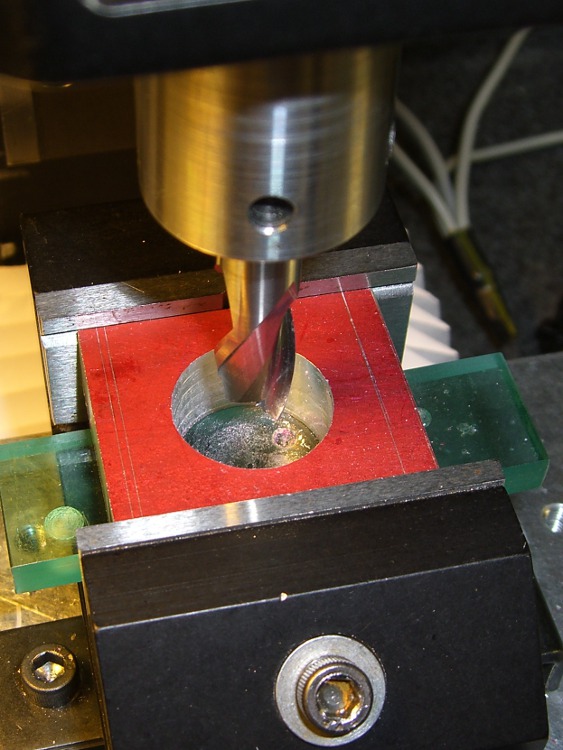
Drill the clearance and tapping holes for the screw, bandsaw it in half, clean up the cut edges …
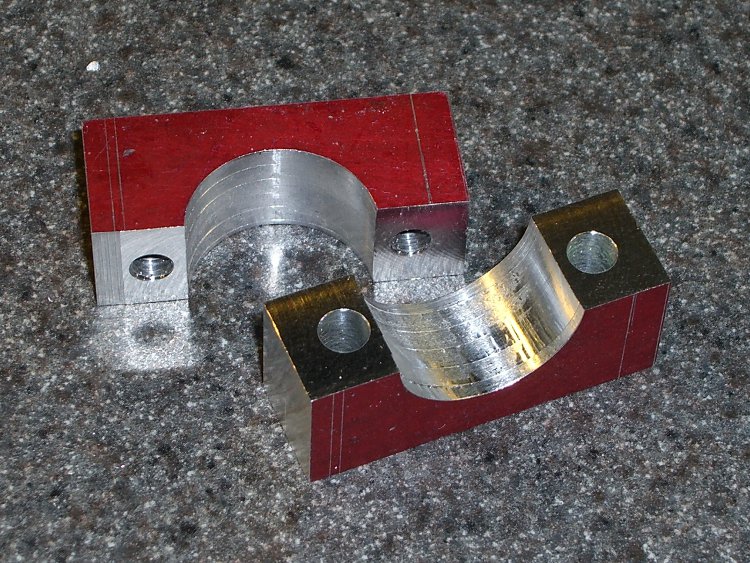
Obviously, I didn’t put those nice bevels on the front side.
Both previous water bottle holders required a spreader plate between the clamp screws and the holder’s screws, but this time the holder had a nice aluminum plate all by itself. It just fit on the Sherline and a bit of manual CNC center-drilled the curved plate and poked a jobber-length drill through the holes …

And then it fit perfectly on the bike …

A side view …

Now, to find a wedge pack big enough for the HT and small enough to fit in the holder!

I put a new bag in the vacuum cleaner while machining the prototype case for the bike radio adapters, which was a Good Thing: the swarf from those two halves filled the entire bag!
I gutted the bag and dumped the swarf in a pot to melt down for another use. It started as a brick, but I figured having some rounds might come in handy. A bit of rummaging turned up some pill bottles of just about the right size.
Unfortunately, I didn’t think quite far enough ahead: notice the shoulder around the right-hand end of the shorter cylinder? Yeah, the bottom of the bottle was bigger than the top…
Fortunately, I don’t have a deep emotional attachment to the bottles, so carving it off the wax wasn’t a traumatic experience. Things would be different if I’d made a nice custom mold…
Of course, the vacuum cleaner also sucked up the odd screw, paper snippet, older swarf left in nooks and crannies, and some of this and a bit of that. Most of the junk either floats to the top or sinks to the bottom, leaving the rest of the wax in good shape. I suppose I could filter the melt, but it’s pretty thick & gooey, even at 300 °F, and I doubt my cheesecloth is up to the task.
Memo to Self: Do a better job of cleaning up before machining the wax, OK?
I favor a small cylindrical earbud with a good seal inside my ear for use with the amateur radio on my bike. These things come with back vents that allegedly improve their bass response; that’s not a concern for communications-grade audio and, worse, the vent produces a tremendous amount of wind noise.
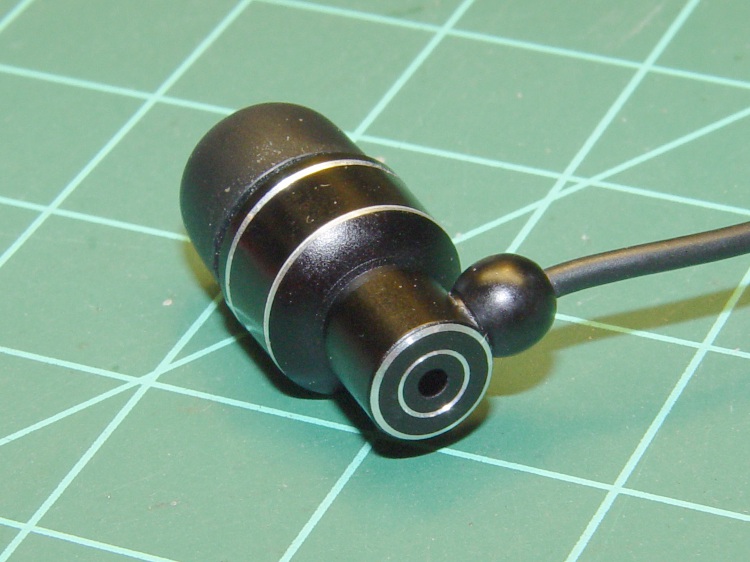
The solution is straightforward: put some tape over the vent!

I used Kapton tape, because I have it, but in point of fact the snippet of duct tape I applied on the first ride (having forgotten to do it on the bench) worked just fine. A drop of epoxy would be fine, too, if you were a bit careful about not letting it ooze down inside the case while it cured.
Despite the fancy appearance, this is a random pick from the assortment of earbuds I’ve bought at $10 or less over the last few years. According to my golden-eared assistant, the audio quality varies dramatically among the assortment, but they all work reasonably well between 300-3000 Hz. I suspect the insanely cheap ones on eBay are essentially the same things, although IMO they’re intended to collect large quantities of high positive ratings: caveat emptor.
Speaking of caveats, insert the usual safety caveats here.
Note that we’re using one earbud for tactical comm, not boppin’ to the music, and the audio level is low enough we (well, I) can’t hear diddly at speeds over 15 mph. Your jurisdiction may prohibit “headphones” or “earphones” or some such, so behave accordingly.
All the officers I’ve met think the radios are a great idea, if that means anything.
This is a prototype for the case that will eventually hold a TinyTrak3 GPS-to-APRS encoder, along with a homebrew circuit board that combines the APRS data with voice from the helmet mic. The case slides into the back of our ICOM IC-Z1A and W-32A HTs, replacing the battery case.
It’s the most complex CNC machining I’ve done so far and I figured that was the perfect reason to carve up a block of machinable wax that’s been sitting on the shelf for far too long.
The exterior view shows why you use wax for the first pass… the ugly gash came from not retracting the end mill before the final G30, combined with trying to clamp a bendy shell in the vise. That was, of course, the final operation on that part!
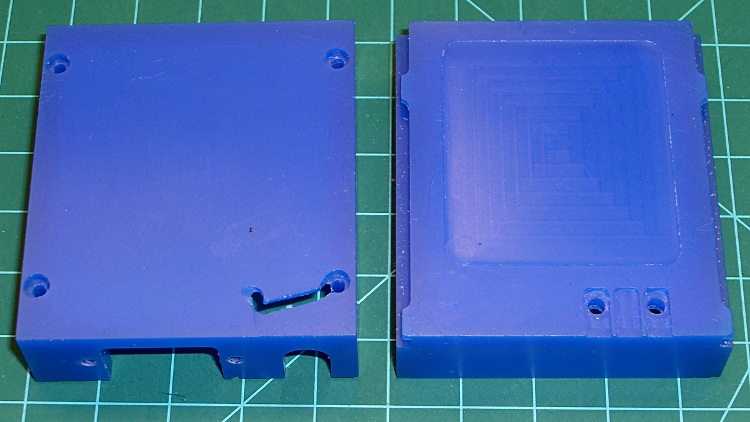
The inside view shows the TinyTrak serial connector cutout (left half), as well as the shoulder to support the audio interface circuit board (right half). The two holes at the upper-right are 4-40 clearance for screws that serve as contacts for the HT’s battery connection and hold the board in place.

These survived far too many setups and takedowns as I figured out how to get all the cuts laid out and in what sequence to do everything. Now that I know a bit more about what to do, the plastic version should come out better; I’m sure I’ll also make better mistakes.
 The Smell of Molten Projects in the Morning